Stride is a demonstration build, not a product on sale. It works in your phone's browser, and you can add it to your home screen.
On a laptop? Scan to get it on your phone, where the app lives.
Walking Example TowerFloor L18
Stride has blurred 1 face.
Stride has checked 41 photos on this walk and found 2 hazards.
Floors
L17 · 40
L18 · 3
L19
L20
L21
What Stride has found
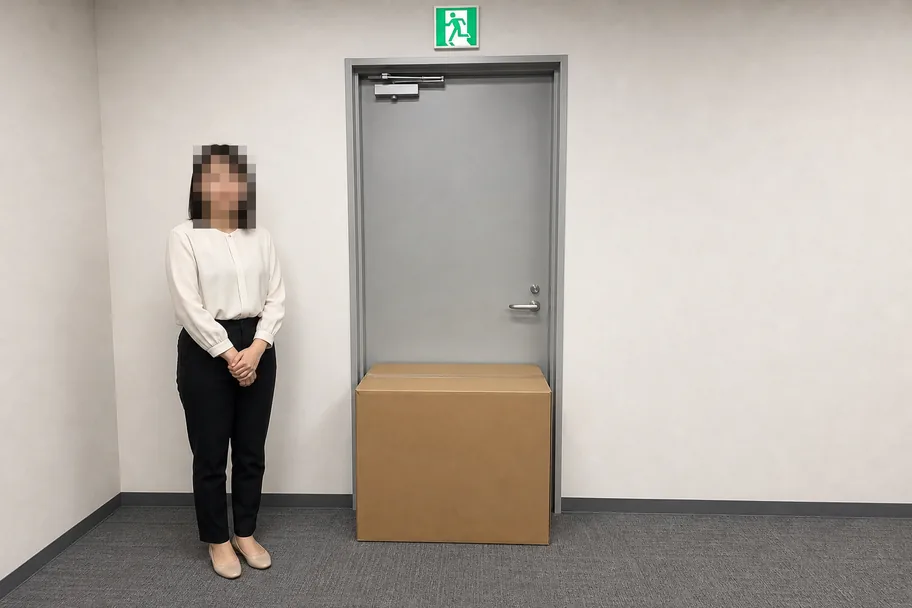
A box is standing in the swing of the exit door.
LowL18 · Blocked exit route
Take a photo now
This is an issue
This is Stride's walk screen. I made the photo with AI, and the building, floors and counts are made up.
How it works
You walk the floor, and Stride keeps the record.
You walk the floor.
Pick the floor you are on and hold your phone up as you walk. The phone pixelates faces before any photo leaves it, and it takes a photo whenever the view changes.
Stride checks each photo.
Stride looks for eight common hazards, such as a blocked exit, a missing extinguisher or a spill. When Stride finds a high-risk hazard, the phone shows a red alert and beeps.
Stride writes the report.
You answer eleven questions the camera cannot, then confirm or dismiss each hazard. Stride writes the report and the PDF, and puts each confirmed hazard on a list of fixes.
Why Stride
Why not just use a checklist app?
A checklist app records that someone ticked a box. It does not show whether anyone walked the fourth floor, or how long they spent there.
Stride's report lists every floor in the building, the time the walker reached it and left it, and how many photos Stride checked there. It warns when a floor got under two minutes or under five photos, and it says which floors nobody walked. A health and safety director can open the report from a shared link, without an account.
Twelve safety and inspection apps were researched on 28 October 2026. None of them shows which floors a facility manager walked in a finished building, how long they stayed and what the camera saw. Stride is the part that gives you proof of the walk.
Example Tower
What the walk on 25 October 2026 found
fm@example.com walked 3 of 5 floors between 09:12 and 09:54, and Stride checked 93 photos. Nobody walked L20 and L21, so this report says nothing about those floors.
3 of 5
floors were walked.
93
photos were checked by Stride.
2
hazards were confirmed by the walker.
0
confirmed hazards are high risk.
Where the walker went
The time the walker reached each floor, the time they left it, and how many photos Stride checked there.
L17 · 09:12 to 09:24 · 12 minutes · 38 of 40 photos checked
L18 · 09:25 to 09:26 · 1 minute · 4 of 4 photos checked
L19 · 09:29 to 09:54 · 25 minutes · 51 of 53 photos checked
L20 · Nobody walked it.
L21 · Nobody walked it.
The floor
When the walker was there
Minutes spent
Photos checked
L17
09:12 to 09:24
12
38 of 40
L18
09:25 to 09:26
1
4 of 4
L19
09:29 to 09:54
25
51 of 53
L20
Nobody walked it.
0
0
L21
Nobody walked it.
0
0
Nobody walked floors L20 and L21, so this report says nothing about those floors.
The walker spent under two minutes on L18.
This example uses a made-up building, walker and times. The headings, the opening line and the warnings are the ones Stride prints.
Privacy
The phone pixelates faces before any photo leaves it.
Stride checks each photo again and deletes any photo in which it can still see a face. Stride stores the database and the photos in Singapore. Each photo goes to the United States once for the hazard check.
Stride checks only what a phone camera can see. It does not replace an inspection by a qualified health and safety professional, and its severity ratings are a guide, not a professional risk assessment.
Status
Stride is a demonstration build, not a product on sale.
The legal set-up a product like this needs is not done: a Singapore company, a lawyer's review of the privacy policy, a data processing agreement and professional indemnity insurance. Until it is done, nobody should walk an occupied building with Stride.
Access
Invite-only
Stride emails you a six-digit code each time you sign in, so you need no password.
Free
100 photos
Stride checks up to 100 photos for each invited person, across every walk.
Get started
Get it on your phone.
Scan to open on your phone
Ask Mark for an invitation first. On a laptop, scan the code to open Stride on your phone. On your phone already? Open Stride, sign in and add it to your home screen:
iPhone: open it in Safari, tap Share, then tap Add to Home Screen.
Android: open it in Chrome, tap the menu, then tap Add to Home screen.
No. Stride checks only what a phone camera can see. It does not replace an inspection by a qualified health and safety professional, and it does not test fire systems, lifts, wiring or anything else the eleven checklist questions cover. Those questions ask whether the right person in Singapore has checked each one, such as a professional engineer or an Authorised Examiner, and the report records your answers.
What does Stride look for?
Stride looks for eight common hazards: a blocked exit route, missing fire equipment, poor housekeeping such as cables across a walkway, missing safety signs, first aid problems, electrical hazards such as exposed wires, damaged floors and stairs, and a wet floor or a spill. You can also tap “This is an issue” to log anything else you see, with a typed note or a voice note of up to a minute.
Are Stride's severity ratings a risk assessment?
No. Stride's severity ratings are a guide, not a professional risk assessment. A qualified health and safety professional must decide the real severity of each hazard. Every regulatory reference in the report says “not yet verified by a qualified person” until someone qualified has checked it.
Can I buy Stride?
No. Stride is a demonstration build, not a product on sale. The legal set-up a product like this needs is not done: a Singapore company, a lawyer's review of the privacy policy, a data processing agreement and professional indemnity insurance. Until it is done, nobody should walk an occupied building with Stride.
How do I get an invitation?
Email hello@insights-2.com and ask Mark for an invitation. Once Mark has invited you, Stride emails you a six-digit code each time you sign in, and you do not need a password. Each invited person gets 100 photos for Stride to check, across every walk.
Where does Stride keep the photos?
Stride stores the database and the photos in Singapore. Each photo goes to the United States once for the hazard check. You can delete your account and every photo from the settings page.
What happens if the phone misses a face?
Stride checks every photo for faces as well as hazards. If Stride can still see a face, or if the check could not run, Stride keeps the description of the hazard and deletes the photo. The phone can miss faces more than about 6 to 10 metres away, which is why Stride runs the second check.
Who can read the report?
You can download the report as a PDF, which Stride builds on your phone. You can also make a read-only link that works for 30 days without an account, so a health and safety director or a building owner can open it on a laptop. You can stop sharing the link at any time.
Ready when you are
Ask Mark for an invitation to try Stride.
Stride is a demonstration build, not a product on sale.